Quickstart
ChatStack AI is a universal interface for Large Language Models (LLMs). It follows a Bring Your Own Key (BYOK) approach, where the user chooses the model provider and interfaces it ChatStack AI using its API Key. By bringing your own API keys, you maintain full control over your data, while our local-first architecture ensures your chat history stays on your machine, not on a remote server. With this approach, you also control your plan and expenses, choosing the provider and model that best suits your needs while always keeping a unique chat UI.
Getting Started
Using ChatStack AI is extremely easy. It only takes 4 steps to start exploiting the power of your favourite AI model.
- Obtain an API Key: Visit the developer dashboard of your preferred provider (e.g., OpenRouter, OpenAI) and generate a new API key. See this guideline to create an OpenRouter API key and start using ChatStack AI for free.
- Configure ChatStack AI: Navigate to Settings > API Keys in the sidebar. Select your provider, paste your key, and click Save. Your key is encrypted locally in your browser; it never leaves your machine unless you opt in for the sync premium features.
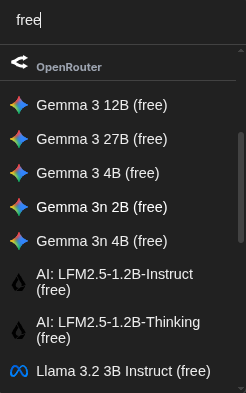
- Select a Model: Return to the main Chat Page (the "Chats" icon in the top left). Use the model selector at the footer of the chat input to choose from the list of available models supported by your provider. Use the search bar to filter free models to test first the API key.
- Start Chatting: Type your message in the prompt area at the bottom and hit Enter. Your chat history will be automatically stored locally in your browser's IndexedDB.
Why Local-First?
ChatStack AI prioritizes performance and privacy. Because your chats are stored in your browser's local database, you experience near-instant load times and total offline access to your history.